Show off your setup! What's your vibecoding setup like?
Mine: Mac studio (main dev), MBA M1, Claude Max, Codex, Gemini (rare). iPad for testing, with handoff (screenshots + apple pencil) for pointing out issues. Wish handoff worked better cos I'm screenshotting rather than copy pasting. I have a digital piano on my desk for testing the audio/midi part of my app. Wispr Flow for dictation, with apple earphones as a mic. Bose speaker for occasional music. Obsidian for notes (though it's a bit flaky, but notion costs $$). Nightly QA skills, deploy to iPad (wired connection) & mac for testing manually. Real users testing + feedback on a daily basis.
Nothing crazy on the development side. Was using worktrees left and right till I saw how much space it was eating up so now I"m a bit more conservative.
Need suggestions on marketing campaign apps/connectors please (incl. emails, tweets, posts, videos - the whole shebang).
One thoughtful comment unlocks the ability to create threads.
15 comments
Just the Claude Code desktop app for me, I like it a lot better than the CLI. It organizes sessions better and automatically handles worktrees under the hood.
Marketing setup is super barebones, I use AWS SES + vibe coded dashboard to send daily digests and email alerts and then browser use for everything else, basically just tell Claude “go do X for me, control my browser”.
Laptop: Gigabyte AERO 16 XE5 OS: Omarchy! (absolutely amazing, check it out here, https://omarchy.org/) Dictation: Superwhispr running a local model Task Management: Notion & Physical paper Terminal: Ghostty, Bash, Tmux Editors: Primarily VS Code and Zed, occasionally Neovim AI Setup:
Herdr for controlling several agents, it also has a really nice feature where it lets an agent like Claude Code spawn other types of subagents running in a different harness like Opencode/Pi
Pi + Sonnet/Opus for quick questions
Claude Code / Opencode for long running tasks
I currently have Claude Pro and ChatGPT Plus, but I also use Opencode's free models for quick tasks
mine is a terminal with 4-5 tmux panes per session (2-3 claudes, codex, agy/grok/etc for diversity), tmux has very minimal visual candy with basic color and name separated tabs, 2-3 tabs overall
it is very simple setup, doesn't depend on HW, and i can run it from anywhere (tailscale) and pretty much anything without losing in performance
Just the Claude Code CLI, with several projects running in parallel. I usually limit it to three or four: three complex projects and one relatively simple one. I remember reading somewhere that our short-term memory can hold seven plus or minus two items, and I try to intuitively model my working sessions around that.
For marketing, I haven’t done a lot of demand gen lately, but for brand work, I’ve had some success getting Claude Code to design custom typefaces, color palettes, and such based on a design direction document I’ve created.
Mac mini running most of my remote sessions
MacBook Pro for daily work
Tailscale + herdr + Moshi for keeping the devices and sessions synced and do run some agents from my phone . This week I'm going to test T3 code to compare.
super whisper with open model for dictation
Obsidian for notes and keeping them in sync through iCloud on all devices
Claude code 5x + Codex pro
I have similar setup to @dan's but also I have a slack bot (Claude Code on an ec2 with my repo checked out) that I use on the go to pick up tasks from the backlog
M5 Pro Mac mini 64gig M4 Pro Mac mini 48 gig(not shown) hardwired to my router for Dev work. IPad Pro 65" screen 55" screen Aris Code Desktop Claude Code Desktop, CLI is meh for me.
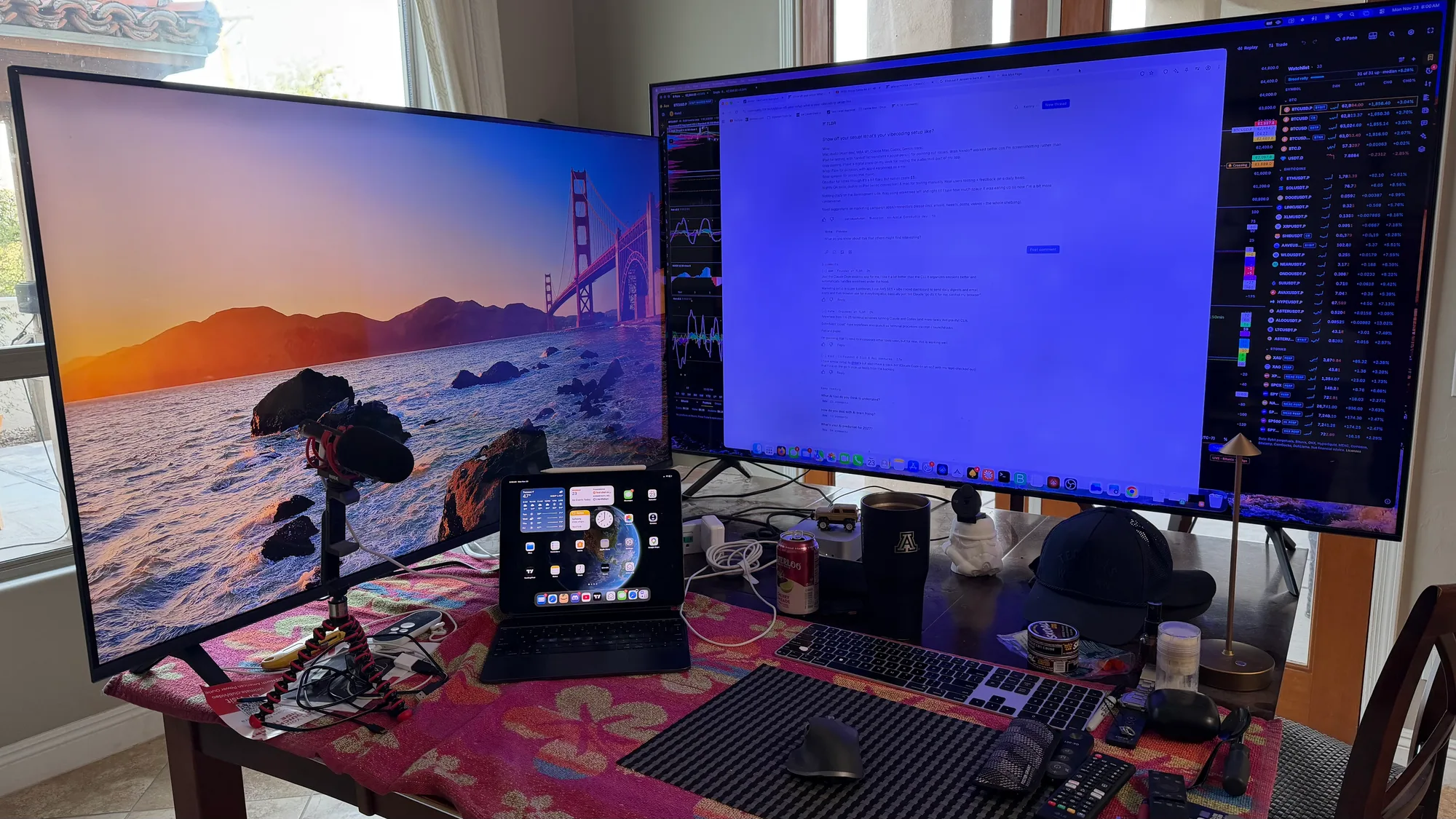
Cool! What do you put on the left monitor? I've never stuck with any setup that required turning my head.
I wrote in more detail here (chicagobuss.dev) about this recently but I do have quite the home fleet of hardware and software at this point.. and my custom paseo re-write crusteo (chicagobuss.dev) is the standard command-center app (along with its mobile companion webapp skiff) to actually do almost everything from.
One of the key goals we have is cost controls. The below is coding done exclusively using subscriptions. The large coding token usage is absorbed by Minimax's huge token allotment, allowing me to leverage Claude for high-reasoning things.
--- Claude Max x20 subscription Minimax Max subscription (legacy) ---
Architect plans in Claude Code with Opus 4.8. For precise plans that don't drift into "Give me the keys! I know better than you!" Opus 4.8 seems more constrained than Fable or Opus 5.5, both of which go beyond what I want and into what they think I want.
Once the plan is in place, I go to Minimax M3, which codes it with a prompt saying to provide a summary and concerns.
I then take the M3 coding back to Opus 4.8, which assesses the code and QA's it. it is not uncommon for M3 to find flaws or gaps in the 4.8 plan and address them.
I then have Opus 4.8 fix any flaws and proceed to testing.
The above is incredibly cost-effective and very efficient as it's rare for M3 to drift off the Opus 4.8 plan. API cost is zero.